Thư viện tài liệu, ebook tổng hợp lớn nhất Việt Nam
Website chia sẻ tài liệu, ebook tham khảo cho các bạn học sinh, sinh viên

 Appendix Scripting CS5
User Interface When you want to provide control over the behavior of a script, some form of a user interface is needed. It can be a fl oating panel with settings to customize, or simply a prompt dialog with OK and Cancel buttons. This section gives an overview of ScriptUI, the module that provides user interface controls and functionality for a scr...
 55 trang | Chia sẻ: tlsuongmuoi | Ngày: 18/01/2013 | Lượt xem: 3619 | Lượt tải: 0
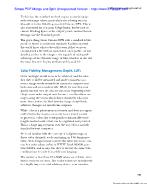 Color Fidelity: Management, Depth, LUTs
Color and light would seem to be arbitrary, and the idea that they could be measured and made consistent as a source image works its way from camera to output seems ludicrous and even undesirable. While it’s true that your goal is rarely if ever the one set out at the beginning of the chapter—to make output match source exactly—there are stages alo...
57 trang | Chia sẻ: tlsuongmuoi | Ngày: 18/01/2013 | Lượt xem: 3470 | Lượt tải: 0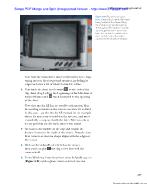 Effects Compositing Essentials
Note that the boundaries don’t really matter here. Capturing most of the foreground monitor, including its edges and even a bit of what’s behind it, is fi ne. 6. Now track the shot, fi rst forward to the end of the clip, then drag back to the beginning of the blue line of tracked frames and track backward to the opening of the shot. Note that mocha...
57 trang | Chia sẻ: tlsuongmuoi | Ngày: 18/01/2013 | Lượt xem: 3426 | Lượt tải: 0 Expressions
 are cool. You can use them to create amazing procedural effects that would otherwise be impossible (or at least impractical). You can also use them to create complex relationships between various parameters. Unfortunately, many After Effects users are afraid of expressions. Don’t be. The fact that you’re reading this chapter indicates t...
57 trang | Chia sẻ: tlsuongmuoi | Ngày: 18/01/2013 | Lượt xem: 3134 | Lượt tải: 0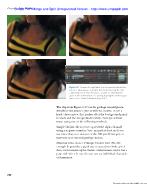 Color Keying
The clip from Figure 6.27 can be garbage matted procedurally in this manner. Just as with the cmatte, create a hard, chewy matte that pushes all of the background pixels to black and the foreground to white. Now spread that matte using one of the following methods. Simple Choker allows you to spread the alpha channel using a negative number. You ca...
57 trang | Chia sẻ: tlsuongmuoi | Ngày: 18/01/2013 | Lượt xem: 3010 | Lượt tải: 0 Eff ects Compositing Essentials
Midtones and highlights pink (light red). If, instead, you adjust Input Black or Output White inward, the tinting moves in the opposite direction—toward cyan—in the corresponding shadows and highlights. As you probably know, each primary on the digital wheel of color (red, green, or blue) has an opposite (cyan, magenta, or yellow, respectively). As...
57 trang | Chia sẻ: tlsuongmuoi | Ngày: 18/01/2013 | Lượt xem: 2716 | Lượt tải: 0 Selections: The Key to Compositing
When you ask After Effects to “guess” how to interpret the footage (on import, by choosing Guess in the Interpret Footage dialog, or pressing Ctrl+Alt+G/Cmd+Opt+G), it looks for sections of uniform color that are mixed into edge pixels, indicating that the correct setting is Premultiplied. Back in Chapter 1, Figure 1.13 presented the same foregroun...
57 trang | Chia sẻ: tlsuongmuoi | Ngày: 18/01/2013 | Lượt xem: 3389 | Lượt tải: 0 Working Foundations
In general, the more responsive you can make your user interface, the better will be the result because you can make more decisions in a shorter period of time. Just leave time to double-check the result if you are in the habit of disabling screen viewers. Multiprocessing Multiprocessing, which allows After Effects to use all of the processor cores...
57 trang | Chia sẻ: tlsuongmuoi | Ngày: 18/01/2013 | Lượt xem: 3018 | Lượt tải: 0 After effects CS5 visual effects and compositing studio techniques
Contents Foreword xi Introduction xxi Section I Working Foundations 1 Chapter 1 Composite in After Effects 3 Organization 11 Take Control of Settings 18 View Panels and Previews 26 Effects: Plug-ins and Animation Presets 33 Output and the Render Queue 34 Assemble the Shot 37 Chapter 2 The Timeline 39 Organization 40 Keyframes and the Graph Editor 4...
57 trang | Chia sẻ: tlsuongmuoi | Ngày: 18/01/2013 | Lượt xem: 3652 | Lượt tải: 0 Layers
Một trong những thành phần chuẩn của Photoshop là Layers, nó chính là nền tảng để bạn có thể tạo nên những bức ảnh đẹp. Trong bài này sẽ giới thiệu một vài thao tác sử dụng layer cơ bản để làm nổi bật một bức ảnh. Bảng Layers là một trong những thành phần quan trọng nhất của Photoshop, bất cứ khi nào sử dụng Photoshop bạn cũng mất rất nhiều thời gi...
12 trang | Chia sẻ: tlsuongmuoi | Ngày: 18/01/2013 | Lượt xem: 2626 | Lượt tải: 1

