Thư viện tài liệu, ebook tổng hợp lớn nhất Việt Nam
Website chia sẻ tài liệu, ebook tham khảo cho các bạn học sinh, sinh viên

 Applying gradients using Illustrator’s Gradient Mesh options
While standard gradients are really nice for shading, they don’t off er the fl exibility you may need for more-complex shading alternatives. With the Gradient Mesh options that are available in Illustrator, you’ll fi nd that you can get much more detailed with the shading and color placement of the gradient. You will start by modifying the apple co...
 33 trang | Chia sẻ: tlsuongmuoi | Ngày: 19/01/2013 | Lượt xem: 3180 | Lượt tải: 0
 Exporting and Saving Files
In this lesson, you will re-create a logo and then save and export the logo in a variety of diff erent ways for use in print and on-line. You will save it as an Illustrator fi le, a PDF, and as a Flash animation. Starting up Before starting, make sure that your tools and panels are consistent by resetting your workspace. See “Resetting Adobe Illust...
33 trang | Chia sẻ: tlsuongmuoi | Ngày: 19/01/2013 | Lượt xem: 2918 | Lượt tải: 1 Working with Symbols
Symbols make it easy to repeatedly use objects throughout an Illustrator project and even across multiple documents. Symbols can be imported, transformed, colored, and edited with the tools built into the Symbols panel, which you will discover in this lesson. Illustrator includes several symbol libraries for you to use, and also makes it easy for y...
33 trang | Chia sẻ: tlsuongmuoi | Ngày: 19/01/2013 | Lượt xem: 2758 | Lượt tải: 0 Formatting type Adobe Illustrator CS4
Adobe Illustrator CS4 provides several options for formatting type in your document. Depending on your desired result, you may want to set some of these options that change the overall appearance of the type. Let’s explore the diff erent options that are available to you. 1 Launch Adobe Illustrator CS4. 2 Press the Go to Bridge button ( ) in the up...
33 trang | Chia sẻ: tlsuongmuoi | Ngày: 19/01/2013 | Lượt xem: 3167 | Lượt tải: 0 Working with the Drawing Tools
What you’ll learn in this lesson: ã Using the Pen tool ã Editing existing paths ã Working with Tracing Presets ã Creating and expanding Live Trace artwork ã Adding color using Live Paint Working with the Drawing Tools Adobe Illustrator includes a number of impressive drawing tools that allow you to create a wide variety of artwork with speed and pr...
33 trang | Chia sẻ: tlsuongmuoi | Ngày: 19/01/2013 | Lượt xem: 2924 | Lượt tải: 0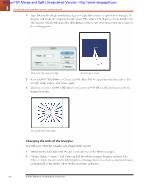 Using shape and transform tools to create artwork
Type 18 into the Angle text fi eld and press Copy. This rotates a copy of your triangle 18 degrees and keeps the original triangle intact. The value of 18 degrees evenly divides into 360 degrees, which will make the distribution of these rays even when you circle back to the starting point. Enter rotate values and press Copy. A rotated copy is crea...
33 trang | Chia sẻ: tlsuongmuoi | Ngày: 18/01/2013 | Lượt xem: 2591 | Lượt tải: 0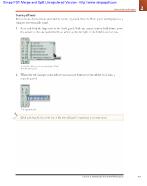 Getting to Know the Workspace
Tearing off tools Related tools (both default and hidden) can be separated from the Tools panel and displayed as a separate, repositionable panel. 1 Press and hold the Type tool in the Tools panel. With the mouse button held down, move the cursor to the tab marked with an arrow at the far right of the hidden tools menu. Tearoff tabs allow you to se...
33 trang | Chia sẻ: tlsuongmuoi | Ngày: 18/01/2013 | Lượt xem: 2760 | Lượt tải: 0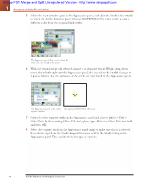 One object, multiple fills and strokes
Select the second stroke again in the Appearance panel, and click the Stroke color swatch to reveal the Stroke Swatches panel. Choose CMYK Yellow. The off set stroke is now a diff erent color from the original black stroke. The Appearance panel allows you to change the stroke and color directly in the panel. 6 With the second stroke still selected,...
33 trang | Chia sẻ: tlsuongmuoi | Ngày: 18/01/2013 | Lượt xem: 2763 | Lượt tải: 0 Adobe Illustrator CS4 Digital Classroom
Starting Up About Digital Classroom 1 Prerequisites .1 System requirements .1 Starting Adobe Illustrator CS4 .2 Fonts used in this book .3 Resetting Adobe Illustrator CS4 preferences 3 Loading lesson fi les 4 Working with the video tutorials 5 Setting up for viewing the video tutorials 5 Viewing the video tutorials with the Adobe Flash Player 6 Add...
33 trang | Chia sẻ: tlsuongmuoi | Ngày: 18/01/2013 | Lượt xem: 3604 | Lượt tải: 0 Exporting Illustrator Files as HTML
When you define slices, grids appear on the artboard. Those gridlines represent table rows and columns that will generate when you save the document as an HTML page (Figure 72b). Figure 72b Slices are displayed on the artboard in Illustrator. After you create a slice, you can configure it as an image slice or a text slice. Text slices (that were cr...
29 trang | Chia sẻ: tlsuongmuoi | Ngày: 18/01/2013 | Lượt xem: 3065 | Lượt tải: 0

